

Background Check Providers for Planning Center: A Comprehensive Comparison Guide
Introduction
Keeping your congregation safe is non-negotiable, and background checks are a foundational piece of any church safety program. If your church uses Planning Center, the good news is that several background check providers integrate directly with PCO People, letting you initiate, track, and manage screening without leaving the platform.
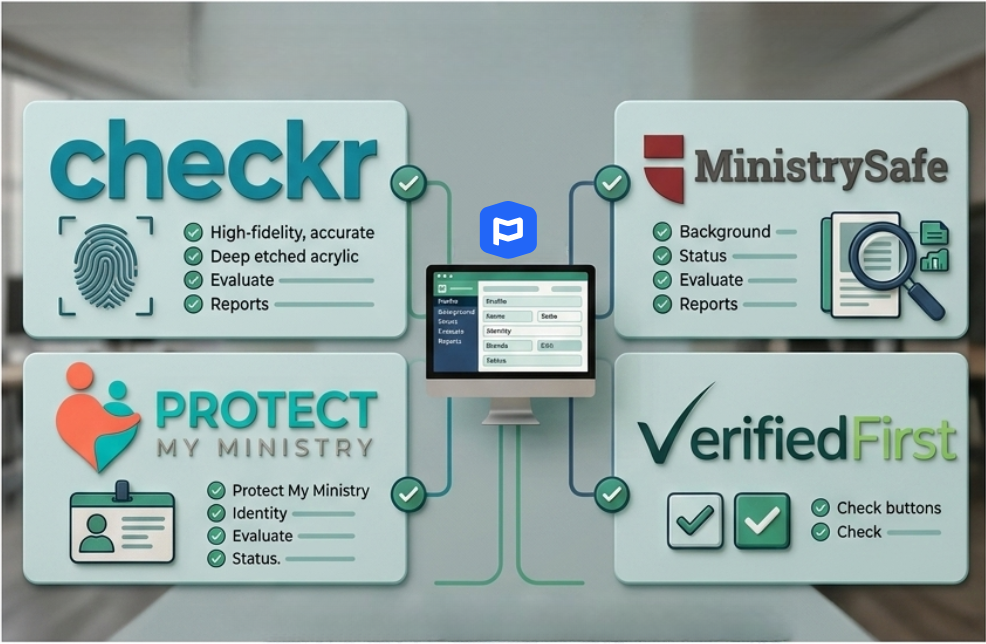
This guide compares the five background check providers that work with Planning Center: Checkr (the built-in default), MinistrySafe, Protect My Ministry, Verified First, and manual tracking. Each provider brings a different mix of pricing, depth of screening, abuse prevention training, and integration depth. Our goal is to help you pick the one that fits your church’s size, budget, and safety philosophy.
How Background Checks Work in Planning Center
Before we dive into providers, here is what Planning Center gives you regardless of which service you choose:
Background check status tracked on each person’s profile (the shield/badge icon)
Secure Teams in Services that block scheduling anyone without a cleared check
Check-Ins settings that require cleared background checks for volunteers at specific locations or events
Bulk actions and automations to add manual background check records in batch
A background check dashboard for at-a-glance status of all checks across your database
The providers below differ in how tightly they plug into that system, what they screen, what extras they offer (like safety training), and how much they cost.
At-a-Glance Comparison
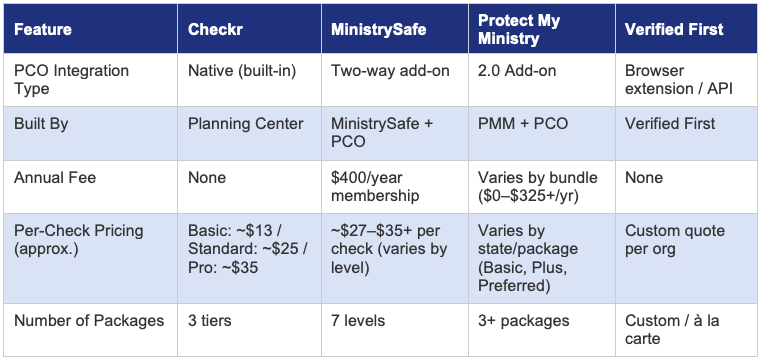
The table below provides a quick side-by-side look at the five options available to Planning Center users.
Provider Deep Dives
1. Checkr
The built-in default for Planning Center
Integration Depth: Checkr is the only provider with a native, first-party integration built directly by Planning Center. You enable it in Account Settings and can order checks from any person’s profile or in bulk from the background check dashboard. Status updates flow back automatically. No browser extensions, no separate logins.
What It Screens: Three package tiers. Basic (~$12.99) searches the national criminal database, Social Security trace, sex offender registry, and global watchlist. Standard (~$24.99) adds county-level criminal searches. Pro (~$34.99) adds 7-year county searches across all addresses. Motor vehicle records can be added to any package for $5. If a hit appears on the national database, Checkr automatically upgrades to county verification at cost (no markup).
Pricing Model: No annual fee, no setup cost. Pay per check. Planning Center has negotiated special church pricing that is passed through at cost. County fees may apply on top of the base package price.
Best For: Churches that want the simplest, most frictionless experience. If you value having everything in one platform with minimal setup, Checkr is the path of least resistance. It’s also the most cost-effective option for churches that primarily need basic-to-standard criminal screening without the extras.
Limitations: No abuse prevention training, no safety policy resources, no legal consultation. Checkr serves all industries, so there’s no church-specific expertise built in. Customer support is general (not ministry-focused). Some users report occasional delays and lack of transparency around final pricing when county fees are added.
2. MinistrySafe
The most comprehensive child safety platform for churches
Integration Depth: MinistrySafe recently upgraded to a full two-way integration with Planning Center. Churches can assign and track sexual abuse awareness training, order and review background checks, and add Planning Center users directly into MinistrySafe—all from within PCO People. It’s a deep integration that goes well beyond just screening.
What It Screens: Seven screening levels searching over 650 million records. Levels range from a basic national search up to comprehensive multi-county, federal, and statewide searches. MinistrySafe emphasizes that no single background check fits every role—someone working alone with children in an unsupervised setting needs a deeper screen than a Sunday morning greeter. They offer free consultations to help churches determine the right level for each position.
Pricing Model: $400/year membership fee covers access to the full 5-Part Safety System: awareness training, skillful screening, policies and procedures, background checks, and monitoring/oversight. Individual background checks are billed per search (contact MinistrySafe for specific level pricing; discounted rates from ~$27–$35 per check are available through denominational partnerships). Sexual Abuse Awareness Training is $8/person; Skillful Screening Training for leadership is $50/person.
Best For: Churches that want a complete child safety program, not just a background check. MinistrySafe was founded by attorneys who specialize in child abuse litigation and offers legal consultation, policy templates, training videos, a monitoring control panel, and a document library. If your church insurance requires abuse awareness training (many do), MinistrySafe bundles everything together. It’s also the strongest choice for churches that need to demonstrate a comprehensive safety system for denominational compliance or insurance audits.
Limitations: The $400 annual fee adds overhead for small churches that only run a handful of checks per year. Background check pricing is not published openly on their website (you need to contact them or get a denominational discount). The platform’s depth can feel like overkill for a church that just needs basic screening.
3. Protect My Ministry

The long-standing church screening veteran
Integration Depth: Protect My Ministry launched a 2.0 add-on for Planning Center in May 2025. Once connected, you can order checks from a person’s profile in PCO People, choose your package, select volunteer location, and optionally add safety training. Results and status sync back to the Planning Center background check dashboard. The integration also handles automated email consent forms sent to applicants.
What It Screens: Packages are organized by state-specific recommendations. Protect My Ministry uses an online consultation tool that evaluates the reliability of national database records in your state and recommends a minimum package (Basic, Plus, or Preferred). Their “true 50-state” sex offender search is a differentiator. They maintain a 99.997% accuracy rating and employ FCRA-trained, US-based researchers.
Pricing Model: Pricing varies by state, county, and package. No single published price list. They offer multiple bundle tiers through their Ministry Mobilizer platform (Bundle 0 through Bundle 4), which can include online training for a one-time $149 fee. Some bundles carry annual platform fees. The per-check cost is competitive but requires contacting PMM or using their sign-up wizard to get exact pricing for your location.
Best For: Churches that have been in the background check game for a while and want a provider that understands ministry. With over 35,000 ministries served, Protect My Ministry has deep roots in the church world. Their state-by-state consultation approach is helpful for churches that don’t know which package to choose. The Ministry Mobilizer platform provides multi-location account management, branded applications, and applicant tracking.
Limitations: User reviews note the platform interface can feel dated and hard to navigate for infrequent users. The cancellation policy requires 14 days’ notice and does not send renewal reminders, which has frustrated some churches. Pricing transparency is limited—you won’t know exact costs until you sign up. The integration is newer than Checkr’s and may not be as seamless for day-to-day operations.
4. Verified First

Enterprise-grade screening with church customization
Integration Depth: Verified First connects to Planning Center through a browser extension and API integration. The extension lets you order, review, and manage checks without leaving PCO People. Volunteer information passes through automatically to reduce duplicate data entry. It’s not a native PCO integration—it’s a layer that sits on top. You’ll need to contact Verified First to set up the API connection.
What It Screens: Verified First offers fully customizable, à la carte screening packages. Standard components include national criminal database, Social Security trace, global watchlist, sex offender registry, and county criminal searches. They also offer drug testing, I-9/E-Verify, employment and education verifications, and driving record checks. They provide direct access to court records (not just database aggregation) and maintain PBSA accreditation. A key differentiator is continuous screening—ongoing monitoring of staff/volunteers after the initial check.
Pricing Model: Custom quotes based on your organization’s needs. No published pricing. Pass-through county and state access fees are added at cost. They do offer an applicant self-pay option (the volunteer pays for their own screening), which can be a budget saver for churches that screen large numbers of volunteers.
Best For: Larger churches and multi-site organizations that need enterprise features like batch rescreening, continuous monitoring, applicant self-pay, and highly customized packages. Verified First partners with major ChMS platforms (ACS/Realm, MinistryPlatform) as well as Planning Center, so multi-platform environments benefit. They boast a 98% client satisfaction rating and under 30-second average support response time.
Limitations: The browser extension integration is less seamless than Checkr’s native connection or MinistrySafe’s two-way sync. Setup requires coordination with Verified First’s team. No built-in abuse prevention training or safety policy resources. Verified First is an all-industries provider with a church vertical, not a ministry-exclusive platform, so you won’t get the same depth of church-specific guidance as MinistrySafe or Protect My Ministry.
5. Manual Tracking (Any Provider)
Use your existing provider and track results in PCO
Integration Depth: Planning Center allows you to manually record background check results on any person’s profile or via bulk actions and automations. You set the status (cleared, not cleared, etc.), completion date, expiration date, and notes. This works with any background check provider—or even checks performed by a denominational office or third-party volunteer.
What It Screens: Whatever your external provider offers. This option is provider-agnostic.
Pricing Model: No additional cost from Planning Center. You pay whatever your external provider charges.
Best For: Churches that already have an established relationship with a provider not listed above, or churches where a denominational body runs checks centrally. Also useful for tracking checks on minors (under 18), which the integrated providers do not support.
Limitations: No automation. You must manually update statuses as results come in. No paperless consent flow through PCO. Higher risk of human error and stale data. You still get the Secure Teams and Check-Ins enforcement features in PCO, but the screening itself happens entirely outside the platform.
Our Recommendations by Church Size
Small Churches (under 200 average attendance)
Start with Checkr. The zero-setup-fee, pay-per-check model means you are not paying for infrastructure you won’t use. For a church running 10–30 checks per year, the Basic or Standard Checkr package keeps costs predictable and the native integration keeps administration simple. If your insurance requires abuse awareness training, add MinistrySafe’s membership later as a separate training layer.
Medium Churches (200–1,000 average attendance)
This is where MinistrySafe or Protect My Ministry start to shine. You likely have enough volunteers that the annual membership fee is justified by per-check volume. MinistrySafe’s 5-Part Safety System is particularly valuable at this size because you’re building out formal volunteer onboarding processes and need training, policies, and screening to work together. Protect My Ministry is a strong alternative if you want state-specific package recommendations and a more guided setup experience.
Large and Multi-Site Churches (1,000+)
Consider Verified First for its batch rescreening, continuous monitoring, applicant self-pay, and enterprise account management. Large churches processing hundreds of checks per year benefit from Verified First’s customizable packages and direct court record access. Pair it with MinistrySafe’s training program for a complete safety system. Alternatively, MinistrySafe alone can handle both screening and training at scale—their control panel is designed for managing thousands of records.
Denominational or Legacy Provider Situations
If your denomination mandates a specific provider or centrally administers checks, use manual tracking in PCO People. You still get Secure Teams and Check-Ins enforcement. Just build a process for regularly updating statuses as checks clear or expire.
Key Questions to Ask Before You Choose
1. How many background checks do you run per year? (Under 25 favors Checkr’s no-fee model; over 50 justifies a membership-based provider.)
2. Does your insurance carrier require abuse prevention training? (If yes, MinistrySafe or Protect My Ministry bundle training with screening.)
3. Do you need to screen across multiple states? (Protect My Ministry’s state-specific consultation and MinistrySafe’s 7-level system help you tailor depth by geography.)
4. Do you want volunteers to pay for their own checks? (Verified First is the only provider here with a built-in applicant self-pay option.)
5. How important is a single-platform experience? (Checkr wins for simplicity; MinistrySafe wins for breadth of features inside PCO.)
6. Are you already using a provider you like? (Manual tracking keeps you flexible while still leveraging PCO’s safety enforcement features.)
Getting Started: Setup Steps in Planning Center
For Checkr: Go to Account Settings in People, enable the Checkr integration, and create your Checkr account. You can begin ordering checks immediately from any person’s profile.
For MinistrySafe: Create a MinistrySafe account ($400/year), then connect it through the Planning Center integration settings. The two-way sync will let you order checks, assign training, and track completion from within PCO People.
For Protect My Ministry: Create a Protect My Ministry account, then enable the PMM 2.0 add-on under the Add-Ons tab in your PCO Account Settings. Follow the setup video to connect your accounts.
For Verified First: Contact Verified First to establish an account and configure your packages. Install the browser extension or coordinate the API integration with their team. Volunteer data will pass through from PCO to Verified First.
For Manual Tracking: No setup required. Navigate to any person’s profile, click the shield icon, and select Add Background Check. Set the status, dates, and notes. Use bulk actions to add checks for multiple people at once.
Need Help Deciding?
Threefold Solutions has helped hundreds of churches migrate to, implement and optimize Planning Center. If you’d like a personalized recommendation based on your church’s size, budget, and safety requirements, reach out to our team. We can walk you through setup, help you configure Secure Teams and Check-Ins enforcement, and make sure your volunteer onboarding workflow is airtight.
Visit us at threefold.solutions or email info@threefoldsolutions.com to get started.
Threefold Solutions — Helping Churches Thrive with Planning Center