
By Michael Visser · Threefold Solutions · Updated June 12, 2026
This week, someone in the Planning Center Community Facebook group asked a question that deserves a better answer than what’s currently online.
The question was simple. Which background check service should we use with Planning Center, and how do they compare? Five options exist: four provider integrations and one manual-tracking approach that works with any external provider. Only one option lists pricing right in the Planning Center help docs. Others share at least partial pricing online, while some won’t tell you the price until you talk to a salesperson.
We did the research most pastors don’t have time for. We gathered the publicly available rates from each provider, walked through each integration, and pulled it all together here.
Here’s what we found.
The Quick Answer
If you want to stop reading right now and just get a recommendation, here it is.
**Start with Checkr.**It’s built by Planning Center, has no annual fee, lists prices publicly ($12.99, $24.99, or $34.99 per check), and gets results back into Planning Center cleanly. For most churches, this is the right answer.
**Move to MinistrySafe if you’re looking for training and policies all in one place.**The $400 annual membership gives you a complete safety system with attorney-developed resources, not just background checks. It’s a great option, especially if your insurer or denomination already partners with them.
**Pick Protect My Ministry if you want a full volunteer pipeline: online applications, consent forms, and built-in screening processes.**There’s no annual fee to run background checks, and their bundles ($175–$1,025 per year) add things like training, custom questions, online consent forms, and tools for managing multiple departments.
**Go with Verified First if you want volunteers to pay for their own checks.**They offer the broadest enterprise feature set (batch rescreening, continuous monitoring, highly customized packages), but all pricing is by custom quote. Their native Planning Center add-on launched April 28, 2026.
Use manual trackingif you already have a preferred provider, if your denomination runs checks centrally, if you use Live Scan or another government agency to pull data, or if you need to screen volunteers under 18. Most churches actually use manual tracking in combination with one of the integrated providers to fill in any gaps.
That’s the quick version. Below, you’ll find the full breakdown, including actual pricing and the integration details that make a difference.
How Background Checks Work in Planning Center
Before you look at different providers, it’s useful to know what Planning Center offers no matter which service you pick:
- Background check status tracked on each person’s profile via the shield/badge icon
- Secure Teams in Services that block scheduling anyone without a cleared check
- Check-Ins settings that require cleared background checks for volunteers at specific locations or events
- List capability to pull profiles with a specific status, result, or expiration date range; this also unlocks automations to trigger emails, workflows, and more
- A background check dashboard for at-a-glance status across your entire database
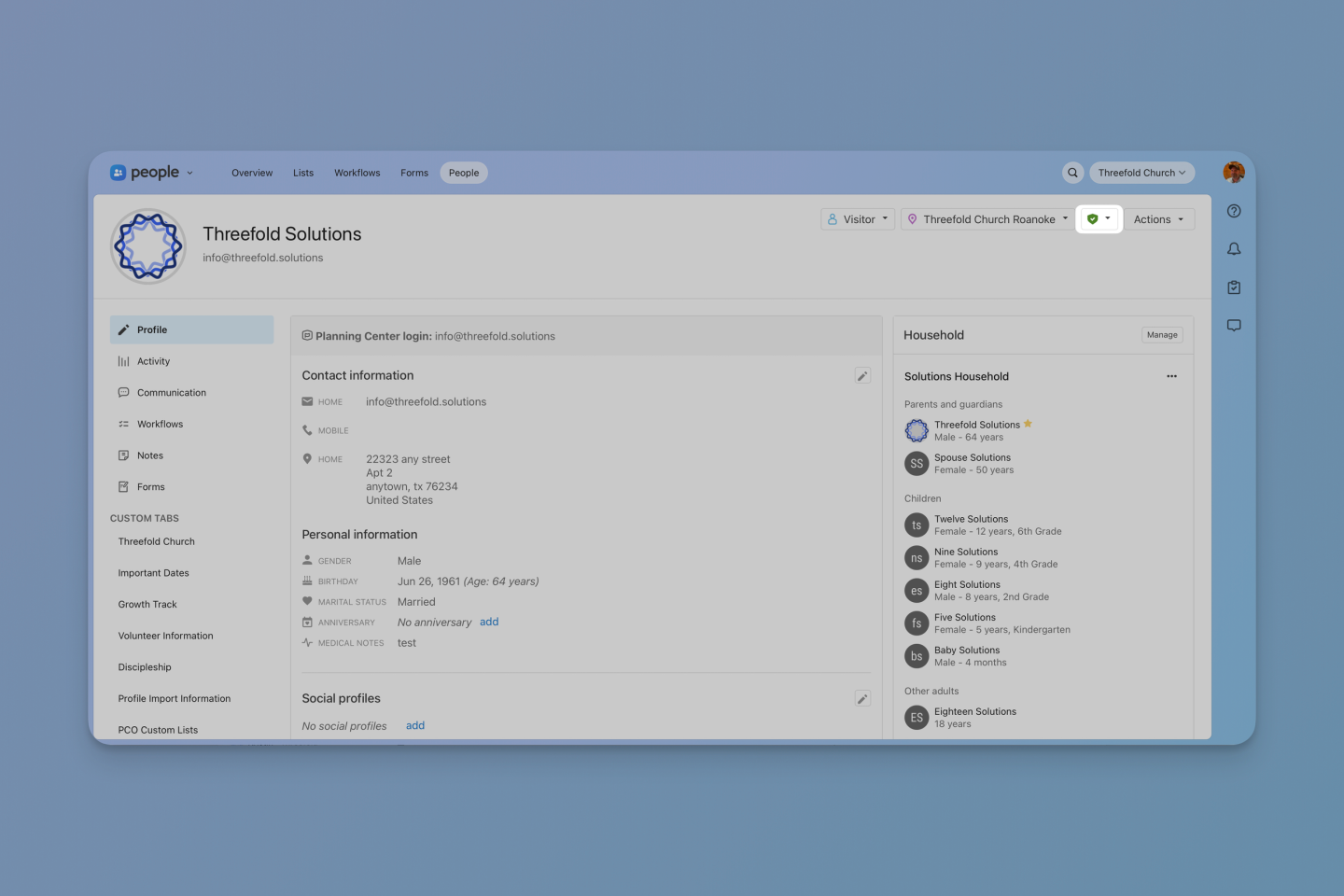
The Background Check Badge is found in the header of each profile.
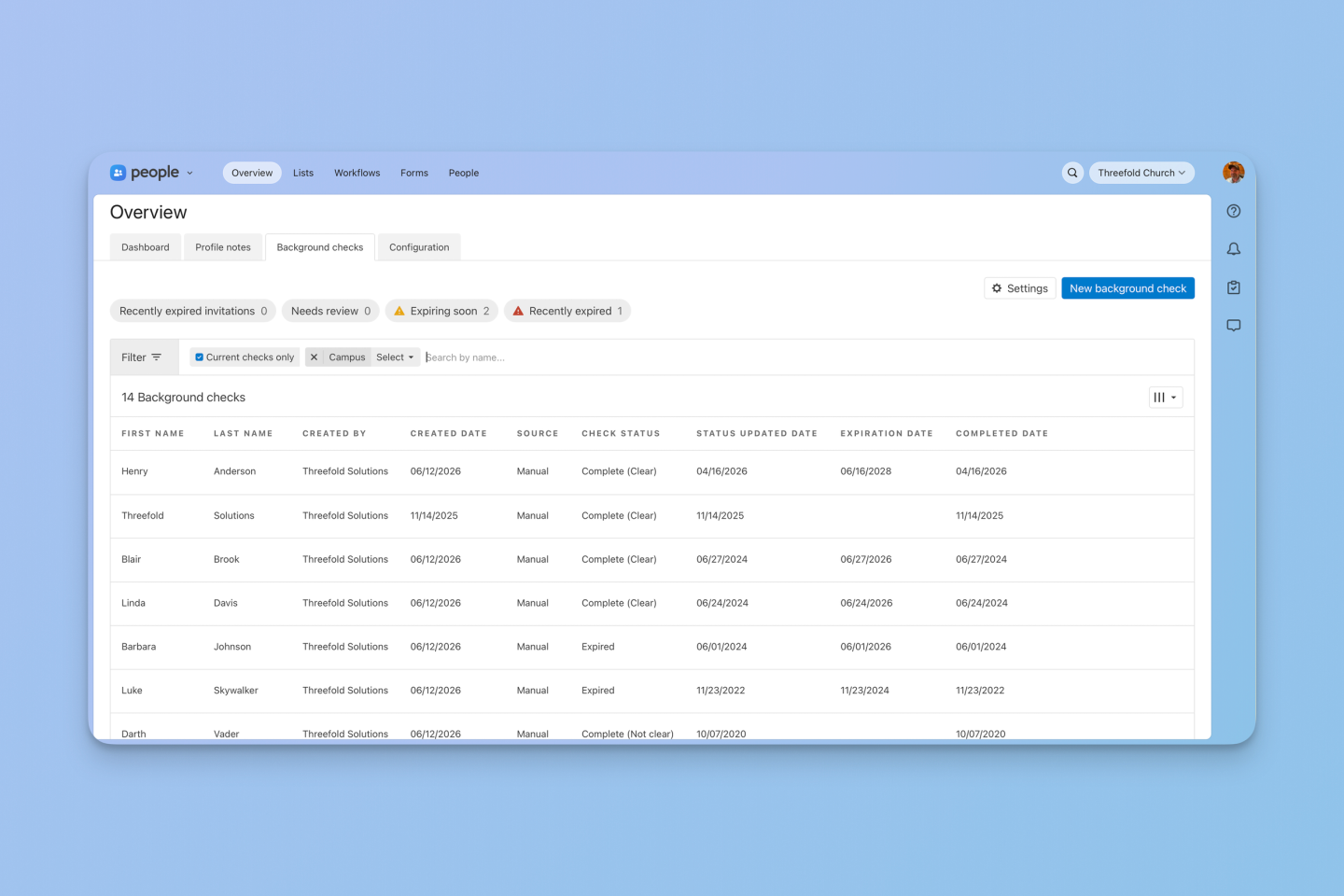
The Background Check Dashboard is available from the Overview tab.
While these features are available no matter which provider you choose, the options differ in how tightly they integrate with Planning Center, what they screen, what extras they offer (such as safety training), and how much they cost.
Why This Comparison Is Hard to Find Online
Most provider comparisons you’ll find for Planning Center background checks are out of date, written before Verified First or Protect My Ministry had native add-ons, or based on partner pricing sheets that the providers themselves no longer honor.
Two of the four providers actively make pricing comparison difficult. While Checkr and Protect My Ministry share pricing online, MinistrySafe only publishes its $400/year membership and training prices, but not background check rates. Verified First publishes nothing.
We’re not mad about it. There’s a reasonable business case for custom pricing in this space, especially when partnerships with denominations and insurers create real discount tiers. But it does mean a church evaluating these providers either makes four sales calls or guesses. This post tries to take the guesswork out of the first 80% of the decision.
At-a-Glance Comparison
Here's the full side-by-side. The provider deep dives that follow explain the nuance behind each row.
| Feature | Checkr | MinistrySafe | Protect My Ministry | Verified First | Manual Tracking |
|---|---|---|---|---|---|
| Planning Center Integration | Native (built-in) | Two-way add-on | 2.0 Add-on (May 2025) | Native add-on (Apr 2026) | Manual entry |
| Built By | Planning Center | MinistrySafe + Planning Center | PMM + Planning Center | Verified First + Planning Center | N/A |
| Annual Fee | None | $400/year | None to run checks; optional bundles $175–$1,025/yr | None | None |
| Per-Check Price | ~$13 / $25 / $35 | Contact for pricing | $12 Basic / $19 Essential / $29 Preferred / $39 Premier | Custom quote | Whatever your provider charges |
| # of Packages | 3 tiers | 7 levels | 4 packages + Add-ons | Custom / à la carte | N/A |
| Screening Databases | Nat'l criminal, SSN, sex offender, watchlist, county | 650M+ records, county, state, federal, sex offender | Nat'l, county, statewide, sex offender (true 50-state) | Nat'l criminal, SSN, county, sex offender, watchlist | Provider-dependent |
| MVR (Driving Records) | Add-on ($5) | Available (higher levels) | Available (higher tiers) | Add-on | Provider-dependent |
| Abuse Prevention Training | No | Yes ($8/person) | Yes (online bundles) | No | No |
| Safety Policy Templates | No | Yes (included) | Limited | No | No |
| Legal Consultation | No | Yes (attorneys on staff) | No | No | No |
| Church-Specific Focus | General (all industries) | 100% church/ministry | 100% church/ministry | General (all industries) | N/A |
| Turnaround Time | ~2 business days avg. | 1–5 days (by level) | Same day–48 hrs | Rapid (direct DB access) | Depends on provider |
| FCRA Compliance | Full | Full | Full | Full (PBSA accredited) | Confirm with your provider |
| Continuous/Rescreen | Manual reorder | Available | Available | Batch rescreen tool | Manual |
| Applicant Self-Pay | No | No | No | Yes | No |
| Tracks Minor Volunteers | No | No | No | No | Yes |
← Scroll to see all providers
Provider Deep Dives
1. Checkr: The Default Choice
Website:checkr.com
Planning Center page:www.planningcenter.com/integrations/checkr
Checkr is the only background check provider with a native, first-party integration built directly by Planning Center. This means that the Planning Center support articles are tailored to Checkr, and you don’t need to leave Planning Center for support documentation. To set up a new account or connect an existing one, visit the Planning Center Account Settings. Once connected, order checks from a person’s profile or in bulk from People in just a few clicks, and results post back to the Planning Center security badge automatically as Clear, Needs Review, or Suspended. For any results that need review, your admins can view details and decide to engage or take adverse action.
What you pay(verified on the Planning Center help docs):
- Basic ($12.99): National criminal database, sex offender registry, SSN trace, global watchlist
- Standard ($24.99): Basic plus one county criminal search
- Pro ($34.99): Standard plus unlimited county criminal searches
- MVR add-on ($5): Motor vehicle record on any package
There’s no annual fee or minimums. You only pay when a check is completed. Planning Center’s own docs confirm they don’t add extra fees to Checkr’s pricing or take a share of the cost.
Heads up: If a Basic check finds something in the National Criminal database, federal law requires an extra county-level search. That means the check could be bumped up to Standard or Pro, which affects the price. Some counties add small access fees, too. Basic works well for low-risk, adult-only roles. Go with Standard for anyone working with kids, money, or vulnerable adults. Don’t forget the $5 MVR add-on for anyone driving.
The limitations: Checkr doesn’t include training, policy templates, or extra features—it’s just a clean, well-priced screening tool. Also, since it serves multiple industries, don’t expect much church-specific guidance.
Turnaround time: Planning Center lists a two-business-day average, but Basic checks usually clear within a few hours.
Pick Checkr If: You wantpay-as-you-go pricing, no long-term commitment, and the smoothest process within Planning Center. This is the best starting point for most small to mid-size churches that have standard background check needs.
2. MinistrySafe: The Ministry-Tailored Option
Website:ministrysafe.com
Planning Center page:www.planningcenter.com/integrations/ministry-safe
MinistrySafe is the only integration that bundles screening with a real safety program. The company was founded by attorneys whose firm specializes in sexual abuse cases. The 5-Part Safety System wraps background checks together with abuse-awareness training, screening training, model policies and procedures, and an oversight dashboard. The training and policies are not throw-ins. They’re the actual product.
The integration has been upgraded to a full two-way sync with Planning Center. Churches can assign and track sexual abuse awareness training, order and review background checks, and add Planning Center users directly into MinistrySafe, all from within Planning Center People. A 24-hour sync also pulls Planning Center groups and lists into the MinistrySafe Control Panel.
What you pay(verified on ministrysafe.com/pricing):
- MinistrySafe Membership ($400/year): This gives you access to the Control Panel, policies, screening tools, and member pricing
- Sexual Abuse Awareness Training ($8/person): Takes about an hour and includes a short quiz and a certificate at the end
- Skillful Screening Training ($50/person): A more in-depth course (about 2.5 hours) with editable screening forms included
- Background Checks (priced per search): Seven different levels are available, with access to over 650 million records
Per-check pricing isn’t listed publicly, but discounted rates may be available through denominational partnerships. MinistrySafe offers free consultations to help churches pick the right level of screening for each role. Anyone working alone with children in an unsupervised setting needs a deeper screen than a Sunday greeter.
The $400 annual membership is only the starting point. For churches that train a lot of staff and volunteers, extra charges can add up quickly. However, the overall cost may still be reasonable compared to setting up a separate training program and screening process. For small churches, though, the annual fee alone can be hard to justify.
Denominational discounts are significant. Global Methodist congregations, several Baptist conventions, LCMS districts, and parts of the UMC all have group memberships where the $400 fee is paid at the conference level. If your denomination is on this list, MinistrySafe may make the most sense for your church.
Keep in mind: Only training and background checks ordered after you enable the integration show up in Planning Center. Older MinistrySafe records won’t sync back, which can cause confusion. Volunteers (especially older ones) may also need some help with the online application. And for small churches running just a few checks a year, the $400 membership might be a lot to swallow.
Turnaround time: 1 to 3 business days for Levels 1 through 5. Higher levels with clerk-assisted county searches can take longer.
**Pick MinistrySafe if:**you want training and screening from the same provider, your insurance carrier requires abuse awareness training, you have a denomination that already partners with them, or you need attorney-built policy templates included. Best fit for churches that need an in-depth safety system.
3. Verified First: The Widest Screening Menu
Website:verifiedfirst.com
Planning Center page:verifiedfirst.com/partner/planning-center
Verified First has the widest screening menu of the four integrations. They’re a PBSA-accredited screening firm, and on April 28, 2026, they launched a native Planning Center add-on. You can now order checks directly from Planning Center People — no browser extension required. Choose preset packages or build à la carte, and track status from each person’s profile without leaving the platform. Existing customers can keep using the browser extension or migrate over; if you’re new to Verified First, the native add-on is the way to go.
Verified First doesn’t publish standard pricing, since every price is a custom quote based on your screening needs and volume. Their blog mentions that most reliable packages fall somewhere in the $30 to $75 range, but you’ll need to request a quote to get exact numbers. They also pass along any county or state access fees at cost.
What sets them apart is the menu. Through the Verified First platform, they offer:
- Criminal database (national), county, state, federal
- Sex offender registry
- Motor vehicle records
- Drug testing
- I-9 and E-Verify
- Education and employment verification
- Professional license verification
- International criminal and verification searches
- Credit checks
- Civil suits
- Vulnerable-population abuse registry
- Continuous screening (ongoing monitoring after the initial check)
A note on those extras: most background check providers (including Checkr and PMM) offer things like drug testing, international checks, and credit reports as general platform features. What varies is whether those services are available through the Planning Center integration specifically, or whether you’d need to go to the provider’s own dashboard to order them. Worth asking your rep which services flow through Planning Center and which must be done separately.
What Verified First has that none of the others offer through Planning Center is Applicant Pay—the ability to pass the cost of the check directly to the volunteer via an emailed link. That’s a meaningful option for ministries screening hundreds of short-term volunteers on a tight budget.
The catch: Pricing opacity is real. You won’t know your actual cost until you talk to a rep and get a quote. The native add-on is brand new, so expect a few integration hiccups early on. Like Checkr, Verified First serves all industries. There’s no church-specific advice built in.
Turnaround time: Most criminal checks are finished in under two business days. Verification checks, like employment or education, typically take about 36–48 hours based on their published data.
**Pick Verified First if:**you want applicant self-pay, need more advanced features like batch rescreening or continuous monitoring, or want a highly customized screening setup. It also tends to work best for larger churches or multi-site teams that need to manage everything across multiple locations.
4. Protect My Ministry: The Volunteer Pipeline
Website:protectmyministry.com
Planning Center page:www.planningcenter.com/integrations/protect-my-ministry
Protect My Ministry has been in the church background check space since 2001, serves over 35,000 ministries in all 50 states, and now operates as part of Ministry Brands. Their software product, Ministry Mobilizer, is more than a screening tool. It’s a volunteer pipeline, with online application forms, consent forms, eSignature, customizable legal agreements, custom branding, a ministry job board, position descriptions, multi-campus support, and child safety training all built in.
If you want one tool that handles “volunteer applies on our website, fills out forms, signs consent, gets screened, gets trained, gets approved, starts serving” — Protect My Ministry is the only one that gives you all of that.
Their state-by-state consultation tool is also really helpful. It looks at how reliable national database records are in your state and suggests a baseline package to use. Their “true 50-state” sex offender search also stands out, and they report a 99.997% accuracy rate with FCRA-trained, US-based researchers.
What you pay(verified on https://www.protectmyministry.com/pco/and https://support.protectmyministry.com/hc/en-us/articles/360043976614-Bundle-Subscriptions):
- Bundle 0 (free): No annual fee to run background checks. Access to ordering checks with no minimum or maximum, and reports are stored for four years. Per-check pricing: Basic $12, Essential $19, Preferred $29, Premier $39. PMM recommends Essential as a minimum since Basic has no county search.
- Bundle 1 ($175/year): Adds child safety training and rescreen notifications
- Bundle 2 ($325/year): Adds online consent forms and volunteer pipeline management
- Bundle 3 ($625/year): Adds custom screening questions and applicant stages
- Bundle 4 ($1,025/year): Adds departments/positions and multiple forms
- Add-ons available: Motor vehicle report, credit report, federal felony/misdemeanor, education verification, employment verification
Important to know: Existing Protect My Ministry clients still need to complete the sign-up process within Planning Center. Skipping this step can cause errors when placing orders, since existing Ministry Mobilizer accounts don’t automatically connect. After signing up, all checks and trainings are ordered through Planning Center, not the PMM Portal. The Portal remains available for account management tasks like creating custom packages, setting up billing references, editing email templates, and adding users.
The catch: Some reviewers on Capterra mention frustration with auto-renewals and the lack of a prorated rate if you cancel. Read the contract carefully before you sign.
Turnaround time: Same-day to 48 hours for most criminal checks.
**Pick Protect My Ministry if:**you want more than background checks: they offer a complete volunteer pipeline. This is a solid choice if your denomination or insurer already partners with them. The step-by-step setup and clear, state-specific guidance are worth noting.
5. Manual Tracking: Any Provider, Tracked in Planning Center
Planning Center allows you to manually record background check results on any person’s profile, or add them in bulk via bulk actions and automations. You set the status (cleared, not cleared, etc.), completion date, expiration date, and notes. This works with any background check provider, or even checks run by a denominational office.
Manual tracking is also your path forward if your church is in a state that requires Live Scan fingerprinting for certain roles. Live Scan results come directly from the Department of Justice and/or FBI, not a commercial screening provider, so none of the existing integrations can pull them in.
You still get full use of Secure Teams and Check-Ins enforcement, as well as list functionality. The screening just happens outside the platform.
What you pay: No additional cost from Planning Center. You pay whatever your external provider charges.
Keep in mind: There’s no automation — statuses need to be updated by hand as results arrive. No digital consent form is built into Planning Center, so there’s a bit more risk for errors or outdated info. Still, this is the most flexible option and costs nothing extra.
To get started: Open a person’s profile, click the shield icon, and choose “Add Background Check.” From there, you can set the status, add dates and notes, and you’re good to go. You can also use bulk actions to add checks for multiple people at once.
Best for: Churches with an established provider not listed above, where a denominational body runs checks centrally, or where state-specific regulations prevent you from using an integrated provider. Also the only option for tracking checks on volunteers under 18, since none of the integrated providers support minor volunteers.
Which One Should Your Church Pick?
These providers aren’t really competing for the same job. They’re competing for adjacent jobs. Here’s how to think about which one fits where.
If you’re a small to mid-size church with no additional features needed, start with Checkr. Run Standard ($24.99) as your default, Pro ($34.99) for staff and high-trust roles, and the MVR add-on for drivers. You can always switch later if your needs grow. The transparent pricing and zero commitment make this the lowest-regret starting point.
If your insurer or denomination already partners with MinistrySafe, skip the comparison. Use MinistrySafe. The partnerships with GMC, LCMS, several UMC conferences, Kentucky Baptist Convention, and others make it an obvious choice. You also get the 5-Part Safety System and policy templates included.
If you’re building a full volunteer onboarding process and want your training, policies, and screening all in one place, both MinistrySafe and Protect My Ministry are strong choices. MinistrySafe is often the better fit for churches whose insurance requires abuse awareness training or who need robust compliance resources, thanks to MinistrySafe’s legal background. On the other hand, Protect My Ministry offers more flexibility with background checks, plus state-specific guidance and tools to manage applicants from start to finish, all within a single system.
If covering background check costs isn’t in the budget and you want volunteers to pay their own way, or if you need advanced features like batch rescreening and continuous monitoring, Verified First is worth a close look. Just keep in mind that pricing is only available after a sales call.
If you’re already running checks outside Planning Center, use manual tracking to bring the records in. Adding the status and additional details to each profile will enable you to use the built-in features even without using an integration.
Key Questions to Ask Before You Choose
- **How many active volunteers do you have?**Each of the providers charges per check, with some requiring an additional membership fee in exchange for additional features. Consider the number of background checks you expect to run annually when estimating the cost differences.
- **Does your insurance provider require abuse prevention training?**If so, MinistrySafe or Protect My Ministry are both great options since they bundle training right in with their screening.
- **Need to screen across state lines?**Protect My Ministry simplifies that with state-specific guidance, and MinistrySafe’s 7-level system lets you tailor checks based on location.
- **Do you want volunteers to pay for their own checks?**Verified First is the only Planning Center integration with a built-in applicant self-pay option.
- **How important is a single-platform experience?**Checkr is the easiest to use, while MinistrySafe stands out if you want more built-in features right inside Planning Center.
- **Do you have volunteers under 18?**None of the integrated providers support minor volunteers. You’ll need manual tracking for those.
- **Are you already using a provider you like or have processes set by your denomination or state regulations?**Manual tracking keeps you flexible while still leveraging Planning Center’s safety enforcement features.
Things to Know Before You Sign Anything
A few caveats that won’t fit in a comparison table.
Every provider passes along county access fees, ranging from $1 to $40 per check, depending on the county. Add a 10–20% buffer to your screening budget for these.
FCRA compliance is your responsibility, not the provider’s. All four providers handle pre-adverse-action notice workflows, but the dispute process and the recordkeeping are on the church. None of this is fully automated inside Planning Center.
State laws sometimes add extra hoops on top of federal rules, especially in California (ICRAA), New York (Article 23-A), and Massachusetts (CORI). Always ask providers how they handle compliance with your state’s requirements. Checking this early helps avoid surprises later.
Switching providers is expensive. Background check records don’t transfer between vendors, which means you risk paying for each check again and asking everyone to go through consent all over. It’s usually best to choose a provider you’re comfortable sticking with for at least three years.
Always get your quote in writing. The provider may give you pricing over the phone, but be sure to get any rates in an email or contract before you commit. Verbal pricing can change.
Getting Started: Setup Steps in Planning Center
**Checkr:**Go to Account Settings in People, enable the Checkr integration, and create your Checkr account. You can begin ordering checks immediately from any person’s profile.
**MinistrySafe:**Create a MinistrySafe account ($400/year), then connect it through the Planning Center integration settings. The two-way sync will let you order checks, assign training, and track completion from within Planning Center People.
**Protect My Ministry:**Create a Protect My Ministry account, then enable the PMM 2.0 add-on under the Add-Ons tab in your Planning Center Account Settings. Follow the setup video to connect your accounts.
**Verified First:**Contact Verified First to establish an account and configure your packages. Enable the add-on from the Integrations tab in Account Settings and share your organization ID with your Verified First rep. Once connected, you can order in bulk from the background check dashboard or individually from a person’s profile.
**Manual Tracking:**No additional setup is required. Just open someone’s profile, click the shield icon, and choose Add Manual Background Check. From there, you can fill in the status, completion and expiration dates, and any notes. Or, use bulk actions to add checks for multiple people at once.
The Bottom Line
There are five background check options that work with Planning Center, but only a few of them are upfront about pricing. That’s helpful to know going in.
For most churches, Checkr is the easiest place to start. It’s simple, affordable, and pretty transparent. MinistrySafe is a better fit if you’re building a more comprehensive safety approach and want training and policies included. Protect My Ministry works well if you’re trying to build out a full volunteer pipeline. Verified First is a good choice when you have more specialized screening needs that the others don’t quite cover. And if none of the integrations fit, manual tracking is still a solid option.
If you’re torn between two options, get quotes from both. The sales conversation itself often tells you more about the provider than any comparison page ever could.
We update this post as pricing and integration features change. If you’ve gotten a recent quote from one of these providers and want to share it (anonymously is fine), reply to this post or email us. Every quote we get makes this guide more useful for the next church.
Threefold Solutions helps churches get the most out of Planning Center through migrations, custom reporting, and ongoing operations support. If you're stuck on something Planning Center-related, start by joining our Threefold community on Circle. It's where church admins ask questions like this and get answers from people who've been there.